 ultimate-guide
Commercial Access Control System Installation Guide
Table of Contents
- What Commercial Access Control System Installation Involves
- Step 1: Site Survey and System Design
- Step 2: Keyless Entry System Installation for Business
- Step 3: Wiring, Hardware, and Software Configuration
- Step 4: Access Control System Cost Estimate
- Step 5: Testing, Commissioning, and Cybersecurity Hardening
- Access Control Maintenance and Repair
- Frequently Asked Questions
Last Updated: September 23, 2026
What Commercial Access Control System Installation Involves
Commercial access control system installation deploys hardware, wiring, and software that lets a business decide who enters which door, when, and under what conditions. It replaces mechanical keys with badges, fobs, PIN codes, or mobile apps, and gives you an audit trail of every entry. This guide from Anytime Unlock and George's Key Shop walks through each phase.
A typical deployment moves through five phases:
- Site survey and system design
- Door hardware and keyless entry installation
- Wiring, low-voltage cabling, and software configuration
- Cost estimation and budgeting
- Testing, commissioning, and security hardening
Step 1: Site Survey and System Design
The site survey is where you decide what the system must do, and it is the step most businesses rush. An installer walks every door, noting frame material, existing hardware, and whether the door is interior or exterior. Exterior doors need weather-rated readers and different power considerations.
A proper survey records:
- Door count and location, plus which doors need controlled entry versus free egress
- Frame and door material (hollow metal, wood, glass, aluminum storefront)
- Existing locking hardware and whether it can be reused
- Power availability near each opening
- Network drops or the path to run new low-voltage cabling
- Traffic patterns, peak hours, and any Americans with Disabilities Act (ADA) requirements for accessible operation
Step 2: Keyless Entry System Installation for Business
Keyless entry system installation for business starts with the door hardware, because the lock determines what the rest of the system can do. An electric strike replaces the strike plate in the frame and lets the existing mechanical lock stay in place. A magnetic lock, or maglock, holds the door shut with electromagnetism and needs a request-to-exit sensor so people can leave.
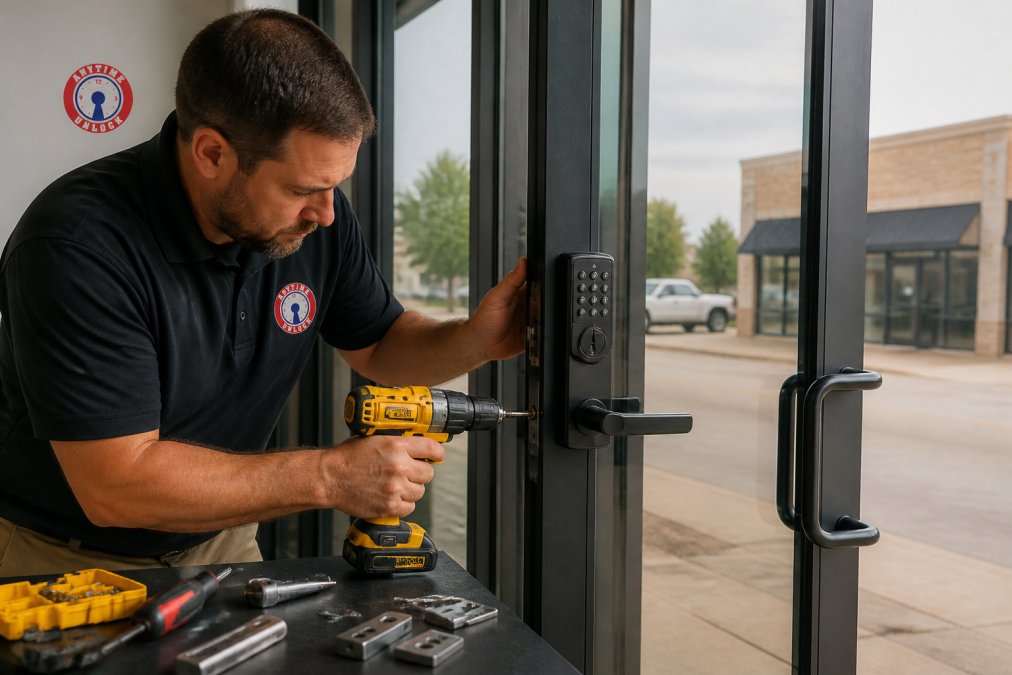
Installation sequence at each opening:
- Mount the reader at the correct height and confirm clearance from the door swing
- Install the electric strike or maglock and align it with the door
- Fit door contact sensors and request-to-exit sensors
- Run low-voltage cabling back to the access control panel
- Terminate, label, and test each connection before closing up the frame
Step 3: Wiring, Hardware, and Software Configuration
Wiring, hardware, and software configuration turns components into a working system. Access control panels live in the communications closet, and every reader, lock, sensor, and exit device home-runs back to a panel. Power supplies, often with backup batteries, feed locks and readers separately from network gear.
On the software side, configuration covers:
- Creating user accounts and assigning user permissions by role or group
- Enrolling credentials, whether badges, fobs, PINs, or biometrics
- Setting schedules so doors unlock during business hours and lock after
- Configuring audit trails so every entry is logged
- Enabling credential encryption so stolen badge data cannot be cloned
Step 4: Access Control System Cost Estimate
An access control system cost estimate depends on door count, hardware type, wiring distance, and labor, so no honest installer quotes a flat number before seeing the site. Build the estimate from categories so the total is traceable.
The main cost drivers are:
| Cost Category | What Drives It | Notes |
|---|---|---|
| Readers and credentials | Reader type, count, credential format | Biometric readers cost more than badge readers; mobile-credential readers sit between them |
| Locking hardware | Electric strike vs. maglock, door material | Glass and aluminum storefronts need specialty brackets and longer lead times |
| Controllers and panels | Door count per panel, network capability | A single panel often handles 2-8 doors; cloud-managed panels add capability but add subscription cost |
| Wiring and power | Cable runs, distance, power supplies | Long runs need heavier gauge wire; a run over roughly 300 feet may need a local power supply or a repeater |
| Labor | Door count, site complexity, after-hours work | Historic, masonry, or hard-to-access doors add hours per opening |
| Software | Standalone vs. cloud-managed licensing | Cloud systems typically carry a per-door recurring fee; standalone is a one-time license |
How to Build the Estimate Door by Door
Build the estimate one opening at a time. For each door, list:
- Reader type and quantity (one reader for entry-only, two for read-in/read-out)
- Locking hardware (electric strike, maglock, or electrified mortise lock)
- Request-to-exit device (push button, motion sensor, or REX-integrated reader)
- Door position switch and any monitoring contacts
- Cable run length back to the nearest panel, plus conduit if the path is finished
- Labor hours for mounting, wiring, terminating, and testing
Phasing and Budget Realism
Most facilities do not need every door on day one. A common pattern is to phase the project: secure the perimeter and regulated areas first (server rooms, pharmacies, cash-handling areas, IT closets), then expand to interior office and storage doors. Phasing spreads cost across budget cycles and lets you learn from the first doors.
Three budgeting realities worth writing into the scope:
- Wiring is the wild card. If the building has no existing low-voltage pathway to a door, the cost of getting cable there can rival the hardware cost. Confirm pathway availability in writing before comparing totals.
- After-hours labor carries a premium. Retail, healthcare, and school environments often require installation outside operating hours, which raises labor rates.
- Recurring costs are real. Cloud-managed systems, cellular failover, and software support agreements are ongoing line items, not one-time purchases. Budget them annually, not just at install.
Scalability: Pricing for the System You Will Have, Not the One You Have Now
A five-door system and a fifty-door system are not the same product scaled up. Panel capacity, software licensing tiers, and network architecture all change as door count grows. Ask two questions:
- Can the chosen panel and software grow to the door count you expect in three to five years without a rip-and-replace? Some entry-level panels cap out at a handful of doors and force a controller upgrade later.
- Does the software license price per door, per user, or per site? A per-door license that looks cheap at five doors can become the largest line item at fifty.
Step 5: Testing, Commissioning, and Cybersecurity Hardening
System commissioning is the formal process of proving every door, reader, and credential works as designed before you accept the installation. Testing catches the reader that reads a badge only at the wrong angle or the strike that buzzes instead of releasing.
A commissioning checklist should confirm:
- Every credential grants access only to its assigned doors
- Request-to-exit sensors release the lock and do not leave it stuck open
- Door contact sensors report held-open and forced-open events
- Fail-safe doors release on power loss; fail-secure doors stay locked
- Audit trails log entries with correct timestamps and user names
- Backup power keeps the system running through a short outage
Access Control Maintenance and Repair
Access control maintenance and repair keeps a working system working, and the businesses that skip it are the ones calling for emergency service. Preventative maintenance is mostly small scheduled tasks: cleaning reader heads, testing backup batteries, checking strike alignment, and confirming schedules match how the building is used.
A practical maintenance rhythm:
- Monthly: test a sample of credentials at several doors and check for stuck strikes
- Quarterly: review user permissions, audit trails, and firmware versions
- Annually: test backup power under load and inspect every cable termination
Troubleshooting the Failures You Will Actually See
Most access control problems fall into a handful of patterns. Knowing the pattern shortens the repair and tells you whether the issue is hardware, wiring, network, or software.
Integration with Building Systems
Access control rarely operates alone. In most commercial buildings it must talk to other systems, and integration failures are a common source of frustration.
- Fire alarm integration. Life-safety code generally requires that access-controlled egress doors release on a fire alarm signal. This is typically handled by a relay from the fire alarm panel to the access control system, and it must be tested during commissioning and after any change to either system. A door that stays locked during a fire alarm is a code violation and a life-safety hazard.
- Video surveillance. Tying a camera to a door event lets you see who used a credential at the moment it was used. This is usually done through the video management system pulling events from the access control software, or through a shared integration platform. Confirm the two systems support the same event format before promising the feature.
- HVAC and building management systems. Access control can feed occupancy data to a building management system so lighting and HVAC adjust to actual use rather than fixed schedules. This is a growing use case but requires that the access control software expose an API or integration the BMS can consume.
- Elevator control. In multi-tenant buildings, access control often extends to elevator floor access. This requires a separate interface to the elevator controller and coordination with the elevator vendor, which adds lead time to any project.
When to Repair and When to Replace
Hardware has a service life. Electric strikes and maglocks last years but wear faster on high-traffic doors. Exterior readers fail sooner than interior ones from weather exposure. Power supplies and backup batteries have the shortest, most predictable life.
Frequently Asked Questions
How much does it cost to install a commercial access control system?
The cost of commercial access control system installation varies based on the number of doors, hardware chosen, and building infrastructure. For an accurate access control system cost estimate, a professional locksmith will need to assess your specific site. Factors include reader type, wiring requirements, and whether you need cloud-managed software. Contact Anytime Unlock and George's Key Shop for a free quote tailored to your business.
How long does it take to install an access control system in an office?
Installation time depends on the size and complexity of the system. A single-door keyless entry system installation for business can often be completed in a few hours, while a multi-door system with wiring and software configuration may take one to three days. The process includes a site survey, hardware mounting, wiring, and testing. Your installer will provide a timeline after assessing your needs.
Do I need a professional for commercial access control installation?
Yes, professional installation is strongly recommended for commercial access control system installation. It ensures proper wiring, compliance with local building codes, and integration with existing security systems. A licensed locksmith or security integrator has the tools and experience to handle low-voltage cabling, power supply units, and firmware configuration. DIY attempts can lead to security gaps and costly repairs.
What does access control maintenance and repair involve?
Access control maintenance and repair includes regular inspections of readers, locks, and controllers, testing of backup power, updating firmware, and checking audit trails. Preventative maintenance helps avoid unexpected failures and extends system life. If a component fails, a technician can replace magnetic locks, electric strikes, or request-to-exit sensors. Schedule annual service with a trusted locksmith to keep your system running smoothly.